gws vs gwscli: Measuring Google's Workspace CLI
By Justin Poehnelt, Google Workspace alum Published 12 min read
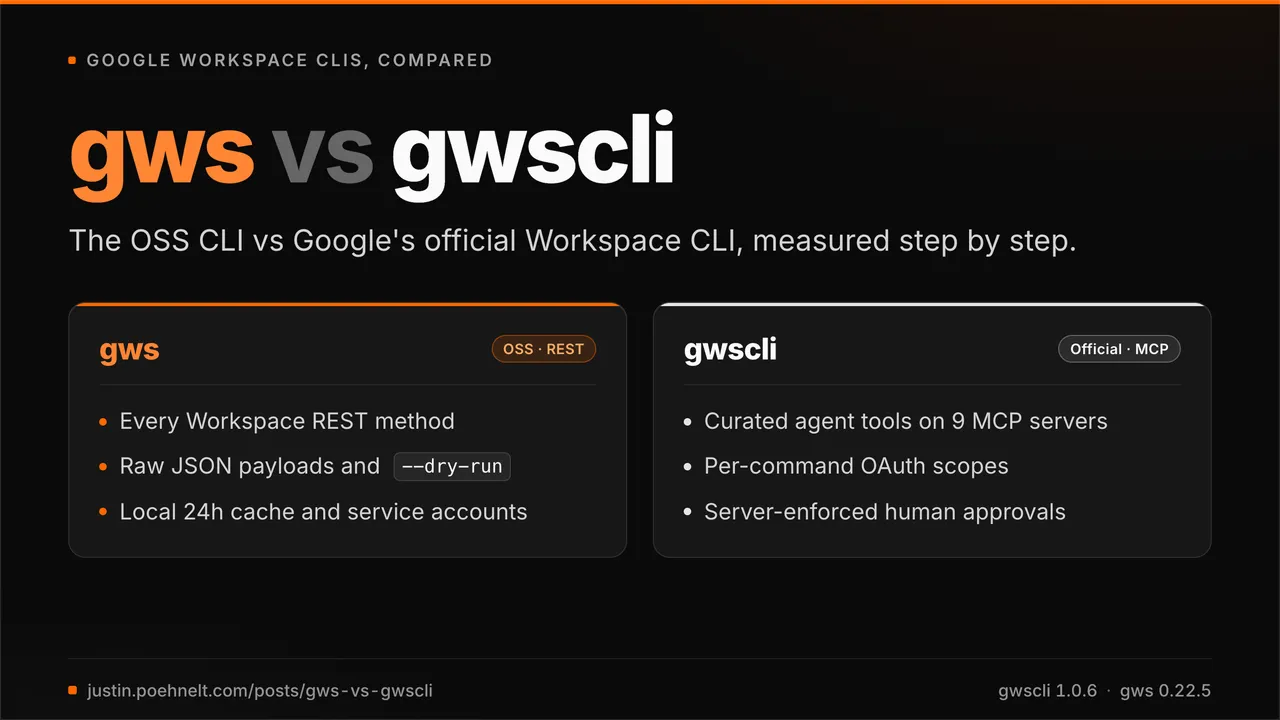
Disclosure. Opus 5.5 and Neon helped generate this comparison, its visuals, and the text below, verified against gwscli 1.0.6, gws 0.22.5, Google’s live MCP endpoints, and official Workspace documentation.
In March, gws launched as an AI-agent CLI for Google Workspace, reaching #1 on Hacker News and gaining thousands of GitHub stars within days.
Two days before Google fired its author, it announced an official Workspace CLI at Cloud Next. On November 24, 2026, Google released gwscli and 8 Workspace MCP servers into GA (People is in Developer Preview), alongside Google Cloud Agent Gateway, standardized usage tiers, and a Workspace AI Tools Addendum. Google’s thesis is that REST APIs fit deterministic apps, while agents need a governed path with DLP checks and human-in-the-loop controls.
All checks below compare gwscli 1.0.6 with gws 0.22.5 using dummy tokens for error tests, unauthenticated tools/list and OAuth metadata calls, and five container runs per command over an HTTPS proxy for relative latency.
The February 2027 MCP deadline
Alongside making gwscli and 8 product MCP servers GA (People is in Developer Preview), Google’s November 24 announcement sets a cutoff for AI access:
AI agents or similar access tools must use MCP to access Workspace data, rather than calling Workspace REST APIs directly. Technical enforcement begins on February 1, 2027.
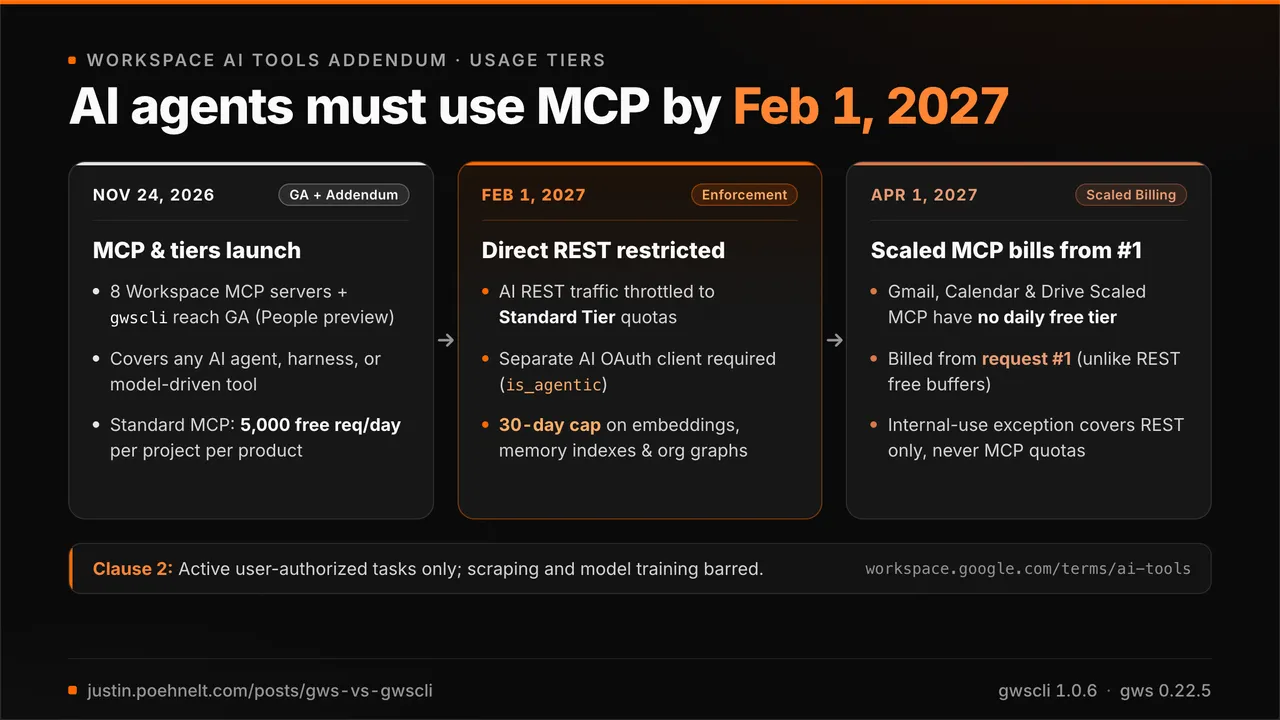
The Workspace AI Tools Addendum (effective February 1, 2027), tools safety policy, and quota pricing guide set four concrete rules:
- Broad scope beyond autonomous agents. Clause 1 requires Google MCP for any tool that is or is driven by “an AI Agent, an AI Harness or an AI model or service employing an AI model,” and bars obfuscation or circumvention.
- 30-day cap on derived indexes and memory. Clause 2(b) bars storing “Google Technical Information” (vector embeddings, memory indexes, user profiles, and organizational graphs) past 30 days. Clauses 2(a) and 2(c) restrict processing to active, user-authorized tasks, and Clauses 2(e), 2(f), and 2(g) bar scraping, model training or evaluations, and rival Workspace products.
- February 1, 2027 enforcement and OAuth split. Direct REST calls from AI tools drop to Standard Tier quotas regardless of project tier. That explains why
gwsclirequires Use this client for an AI-powered agent (is_agentic) on a separate OAuth client from traditional app traffic. - Usage tiers and April 1, 2027 billing. Standard Tier caps free MCP at 5,000 requests per day per project per product. Starting April 1, 2027, Scaled Tier Gmail, Calendar, and Drive MCP bill from request one while REST keeps daily free allowances, and the internal-use exception applies only to REST quotas.
For AI-native mail clients, enterprise search tools, and AI CRMs built on Gmail and Drive REST APIs, those rules require splitting AI workflows onto separate is_agentic OAuth clients and dropping derived embeddings, memory indexes, profiles, and org graphs after 30 days. That deadline turns a CLI comparison into a migration audit: missing commands, blocking stdin approvals, local-browser OAuth limits, and opaque errors become production blockers.
Architecture: gwscli is an MCP client
Every gwscli command wraps a tool on Google’s remote Workspace MCP servers: https://<product>mcp.googleapis.com/mcp/v1 for Gmail, Calendar, Drive, Docs, Sheets, Slides, Chat, and Tasks, plus https://people.googleapis.com/mcp/v1 in Developer Preview.
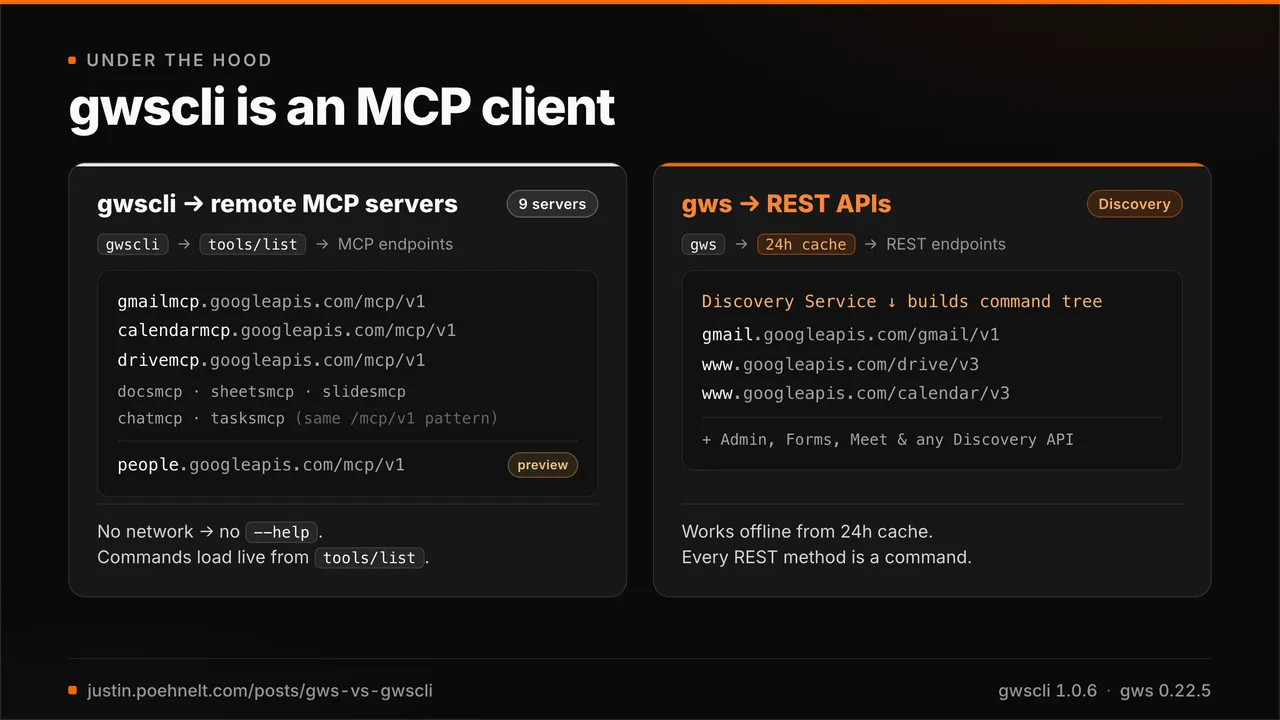
gwscli ships no local command list. It calls tools/list whenever it builds commands, so blocking the network breaks even --help:
Warning: failed to load MCP tools for server "gmail": failed listing tools on server "gmail": ...
Error: service "gmail" is currently unavailable; failed to generate commands from the server.
Server errors return as MCP tool results (a JSON envelope with a content text array and "isError": true), not REST errors. Every trade-off below follows from this MCP abstraction tax.
Measuring the agent loop
Moving agents off REST runs every loop step through gwscli instead of gws.
Discover
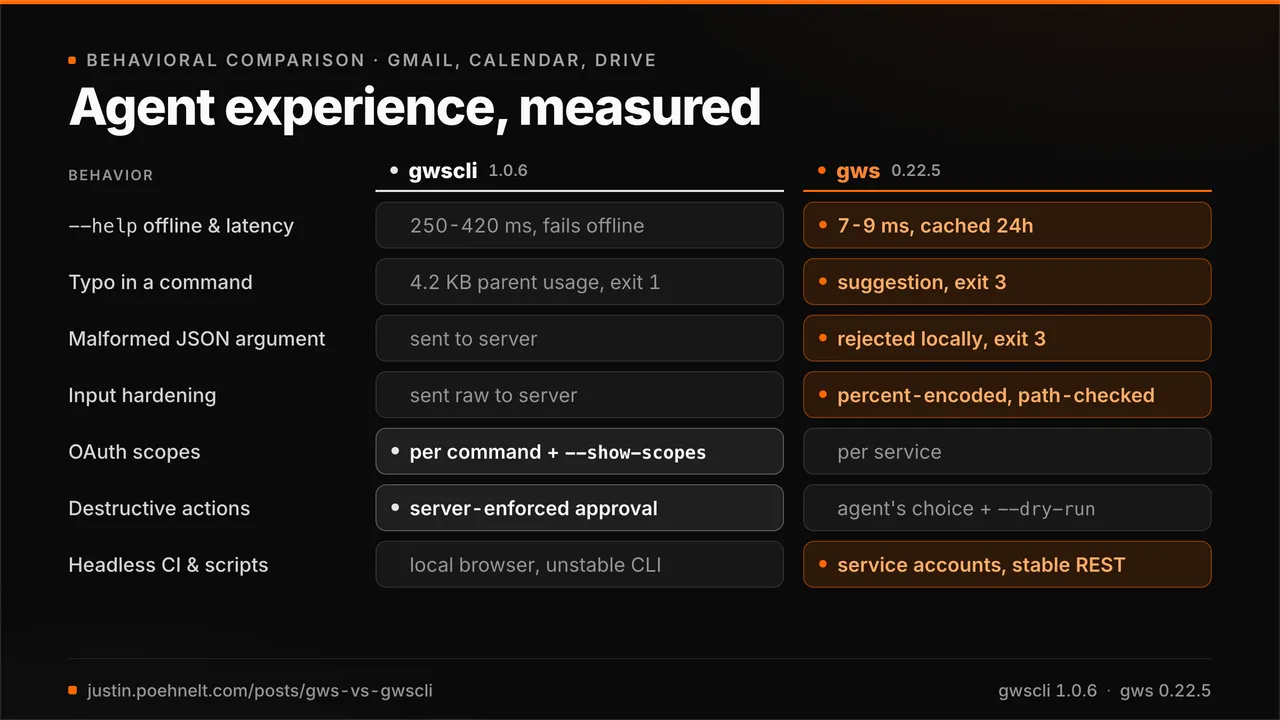
Every gwscli --help call hits the network, taking 250 to 420 ms in container tests and failing offline. gws caches Google’s Discovery schema for 24 hours and answers in 7 to 9 ms.
Help text is a model prompt. gwscli prints each MCP tool description directly as CLI help. Gmail, Calendar, and Drive help contain 50 mentions of “the user,” 8 instances of “Call this tool,” and instructions like “you MUST FIRST call search_files.” search_threads embeds the full Gmail search operator reference, giving agents exact query syntax inline.
The prompt leaks nonexistent commands. Because --help prints raw MCP descriptions unfiltered, it names symbols absent from gwscli:
generate_idsandget_folder_tree(“when available”), neither of which is agwsclicommand'ListDraft'and'SearchThreads', internal method names- six deprecated flags still listed, including one marked
Deprecated: DO NOT USE!!
Humans ignore those leftovers, while agents treat any symbol in --help as callable.
Curated write flags simplify complex APIs. gwscli calendar create_event exposes 23 focused flags, simpler for a model than the raw Calendar schema behind gws schema calendar.events.insert. Part 1 of this series argued that raw payloads beat bespoke flags, which still holds for reads and full coverage, while curated flags reduce mistakes on common writes.
Authorize
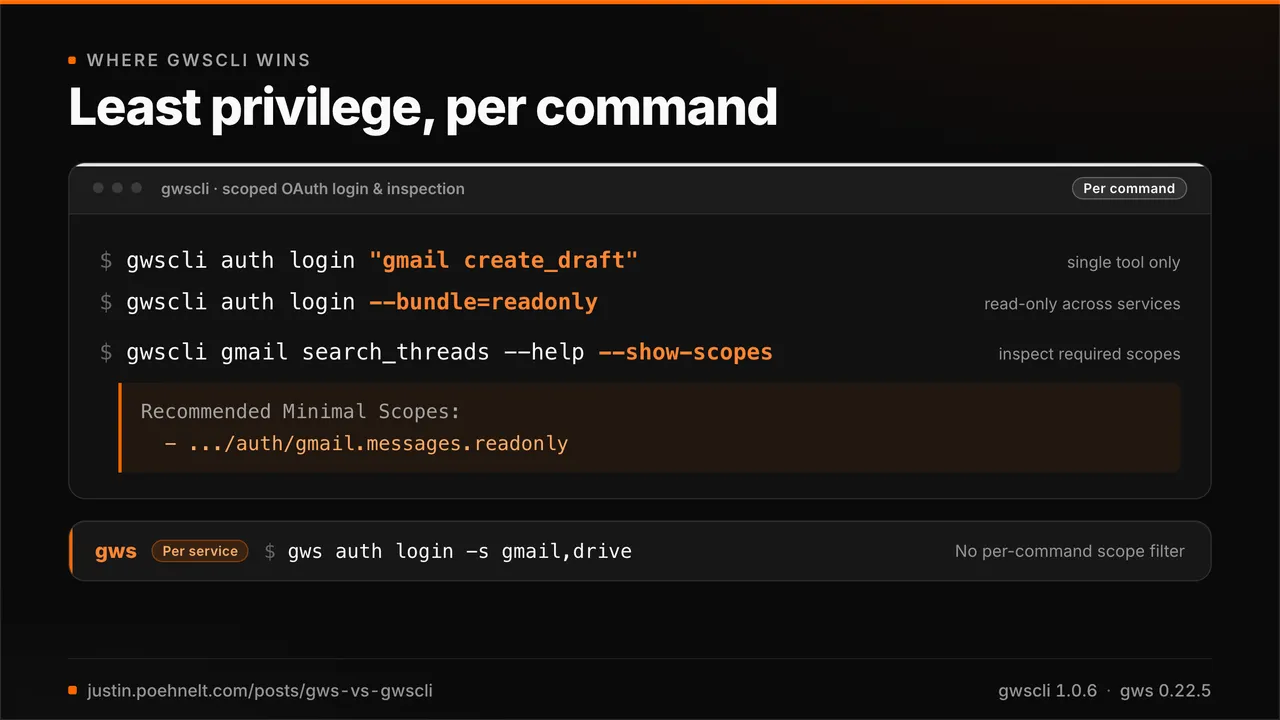
Per-command authorization is where gwscli beats gws:
- Least privilege per command.
gwscli auth login "gmail create_draft"grants only that command’s scopes, and--bundle=readonlygrants read access across all services. - Inspectable scopes. Every command supports
--show-scopes, listing accepted scopes and the minimal set required (gmail.messages.readonlyforsearch_threads). - Actionable missing-token errors. Without a cached token,
gwscliprints the exact login command:
Error: failed to obtain token source: no valid cached token found. Run `gwscli auth login gmail list_labels` before rerunning this commandThe trade-off is headless automation. Your OAuth client must enable Use this client for an AI-powered agent, and login requires a local browser reaching 127.0.0.1. Service accounts work only as domain-wide delegation tokens passed via --oauth_token.
gws runs in CI via service account key files, exported credentials, and token environment variables, at the cost of coarser per-service scopes (-s gmail,drive).
Construct and execute
The two CLIs take opposite syntax approaches:
# gws: one command per REST method, raw JSON in
gws gmail users threads list --params '{"userId": "me", "q": "is:unread"}'

# gwscli: one command per agent task, named flags
gwscli gmail search_threads --query "is:unread"
Named flags beat nested JSON with an easy-to-forget userId, though gwscli still falls back to JSON and repeated flags:
- Nested inputs pass as JSON strings inside flags:
--preferences,--guestPermissions, and--workingLocationProperties. - List inputs repeat
stringArrayflags, which do not split on commas in the flag librarygwscliappears to use. Passing--to a@x.com,b@x.comlikely creates one recipient with a comma, and without--dry-run, an agent cannot verify the parsed call.
gwscli exposes far fewer commands:
| Service | gwscli | gws |
|---|---|---|
| Gmail | 23 | 79 methods + 7 helpers |
| Calendar | 9 | 38 methods + 2 helpers |
| Drive | 9 | 64 methods + 1 helper |
Fewer commands narrow an agent’s choices while leaving direct migration gaps before February 2027.
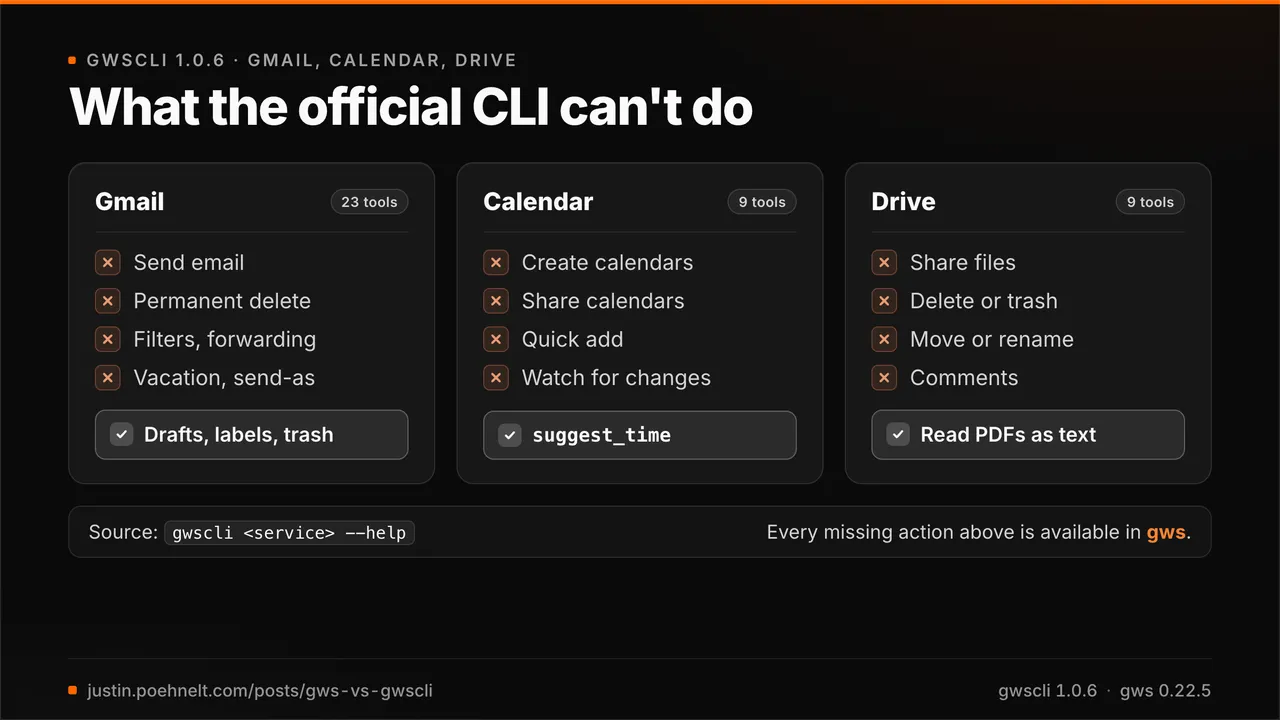
- Gmail searches, reads, drafts, labels, trashes, and marks spam, but cannot send email (
create_draftis the only compose command). Google’s launch thread and MCP elicitation guide cite sending email as an approval example, yetgwscli1.0.6 ships no send command. - Calendar adds
suggest_timeacross attendees and semanticsearch_events. Unlike Gmail,calendar create_eventsupports external attendees viaattendeesandnotificationLeveland triggers a server-side approval under default policy. Calendar still cannot create or share calendars, quick add, or watch changes. - Drive adds
read_file_content(extracting text from Docs, PDFs, Office files, images, and video transcripts) andsearch_filesterms absent from Drive v3’sqparameter (visibility = 'external',ancestors,sharedFrom,followUp). It cannot share, delete, move, or rename files.
Both CLIs output JSON and shape responses differently. gwscli shapes payloads server-side via THREAD_VIEW_IDS_ONLY, THREAD_VIEW_SUMMARY, --messageFormat, --snippetVerbosity, --excludeContentSnippets, and viewUrl links. gws provides field masks and NDJSON pagination on every method, leaving shaping to the agent.
The bundled skill and --help conflict on one command: the skill says drive read_file_content returns “direct Markdown/text strings” (warning agents not to pipe to jq), while --help says Format: JSON and --schema defines a JSON object with fileContent. Agents following the skill parse it differently from agents following --help.
Recover
Running the same broken calls against both CLIs shows how each handles recovery:
| Mistake | gwscli | gws |
|---|---|---|
| Typo in a command | Exit 1. 4.2 KB of the parent’s usage, no suggestion | Exit 3. “a similar subcommand exists: ‘list’” |
| Typo in a service | Exit 1. “Did you mean this? gmail” | Exit 3. Lists every known service |
| Missing required argument | Exit 1. Names the flag, then prints the parent’s usage | Exit 3. “Required path parameter fileId is missing” |
| Malformed JSON argument | Sent to the server | Exit 3. “Invalid —params JSON … line 1 column 2” |
| Invalid enum value | Sent to the server | n/a |
| Misspelled parameter name | Exit 1. Unknown flag | Accepted. pageSizee passed through without error |
| Not signed in | Exit 1. Names the exact auth login command | Exit 2. Names gws auth login and the env var |
gwscli exits 1 for every error, forcing agents to parse prose to tell auth failures from typos or server errors. Unknown commands dump 4.2 KB of parent usage text with no suggestion.
gws separates exit codes (2 auth, 3 validation), prints JSON errors on stdout and one human line on stderr, and validates JSON locally, though pageSizee slipped past parameter validation.
Input hardening from Part 1 splits the same way. Passing ../../x, abc?alt=media, %2e%2e, and a control character as file IDs sent all four raw to the server in gwscli, while gws percent-encoded each value and rejects --output paths outside the working directory.
Act safely
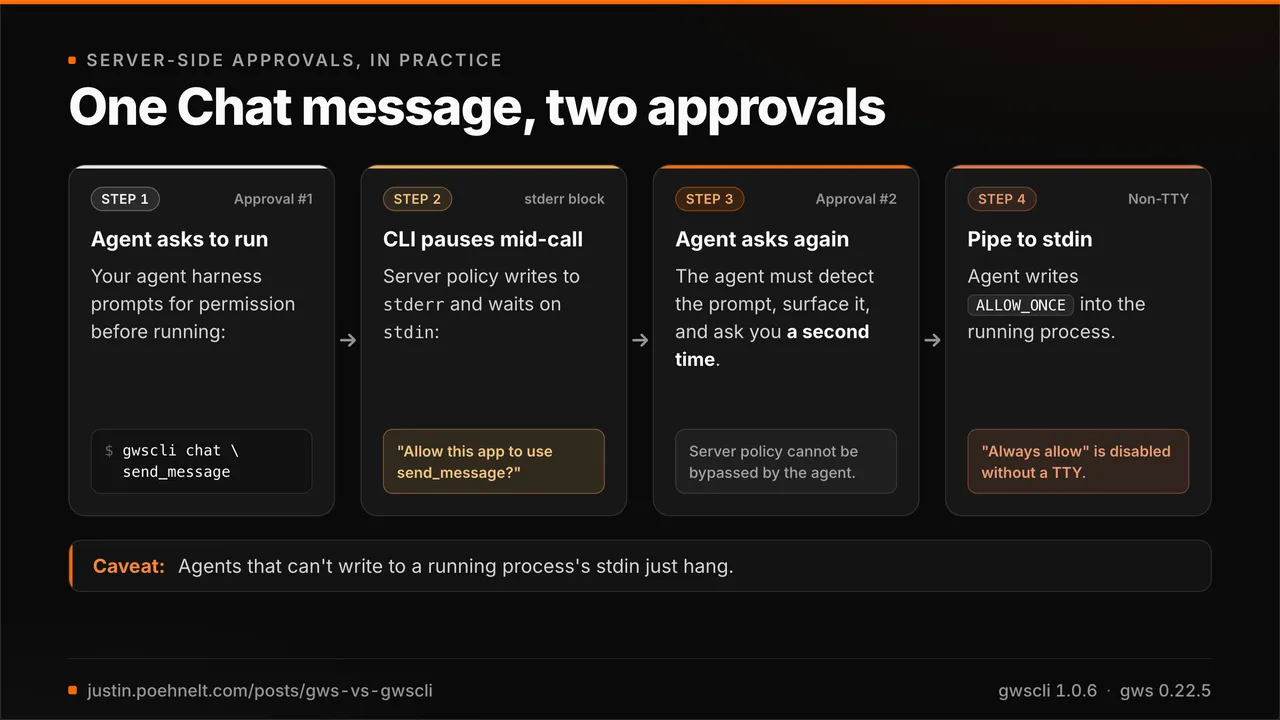
gws gives agents --dry-run on every call and --sanitize to scan responses through Model Armor for prompt injection, leaving opt-in to the agent.
gwscli moves enforcement off the client. Its guide states Workspace “enforces user and administrator approval policies for sensitive actions, such as sending messages, sharing content externally, trashing items, or deleting data.” Google’s gwscli skill and MCP elicitation guide document the stderr prompt while the CLI waits on stdin:
Allow this app to use send_message?
approval_choice (Options: Allow once, Always allow this tool, Don't allow):
That guide adds that trashing prompts on every call and writes to shared resources prompt by default. No static list governs prompts because the server decides per call from user and admin policy.
Server-side enforcement is the strongest idea in gwscli. Users can disable local harness prompts, and Workspace admins cannot inspect or enforce them, whereas a server prompt still holds even if email prompt injection hijacks the agent.
That model creates four friction points for shell agents:
- Double approvals. The agent asks to run the command,
gwscliblocks on stderr, and the agent must ask again before writingALLOW_ONCEto stdin. - No persistent approval over pipes. The bundled skill states persistent options “require an interactive terminal (TTY) and are disabled when confirming via piped or non-TTY STDIN,” blocking agents from using “Always allow this tool.”
- Conflicting docs. Google’s elicitation guide tells agent hosts to set Workspace MCP confirmation to “Always allow,” while the
gwscliskill instructs agents to confirm every write anyway. - Stalled non-interactive harnesses. Harnesses that run commands to completion before reading output cannot answer mid-command prompts and hang.
Reviewing the nine remote MCP servers
Because gwscli passes MCP tools through directly, testing the remote MCP servers shows what generic MCP clients see. initialize, tools/list, and OAuth metadata respond unauthenticated, making checks against the MCP 2025-11-25 specification and Anthropic’s tool-writing guide directly reproducible.
Spec compliance and auth
Across MCP 2025-11-25 checks, all 9 servers declare tools, negotiate protocol versions (2024-11-05 to 2025-11-25, falling back to 2025-11-25), reject unsupported MCP-Protocol-Version headers with 400 (-32600), return 202 on notifications and 405 on stateless GET, enforce unique valid names across all 69 tools, serve OAuth protected resource metadata with PKCE S256, return 401 on invalid tokens, and enforce human approval. Four findings remain:
- No
Origincheck on unauthenticatedtools/list. The spec requires403on invalidOriginheaders, yetOrigin: https://evil.examplereturned200. That rule targets DNS rebinding (higher risk on local servers than public OAuth endpoints), and authenticated calls were not tested. - No client ID metadata documents or dynamic client registration.
accounts.google.comadvertises neither (SHOULD and MAY in the spec), andWWW-Authenticateon401omitsscope(though per-tool metadata lists scopes). Clients must configure OAuth manually. - Mismatched
resourceidentifiers. Per-tool metadata at/.well-known/oauth-protected-resource/list_labelsreportshttps://gmailmcp.googleapis.com/mcp, while server-level metadata reportshttps://gmailmcp.googleapis.com/mcp/v1. RFC 9728 expects a match, so strict clients could reject it (real clients were not tested). - HTML 404s on unadvertised methods.
prompts/listandresources/listreturn Google’s “Error 404 (Not Found)!!1” HTML page instead of a JSON-RPC error. Because the servers omit both capabilities, only clients ignoring negotiated capabilities hit this path.
Tool design gaps
Beyond the task commands, response views, and per-tool scopes above, the servers cover the basics: 63 of 69 tools define titles (only Chat and People read tools omit them), 68 of 69 include output schemas (all except download_file_content), parameters use explicit IDs (fileId, threadId, calendarId), and pagination enforces defaults and caps (20 and 50 for thread search). Six gaps remain:
- Sparse enums. Only 34 of 390 input properties define an
enum. Fields likevisibility,responseStatus, andorderBylist allowed values only in prose. - Inconsistent annotations.
slides.update_presentationsetsdestructiveHint: true, whiledocs.update_docandsheets.update_spreadsheetsetfalse.unlabel_threadis destructive whilelabel_threadis not, andgmail.list_draftsis read-only without being idempotent. Practical impact is small because the spec treats annotations as untrusted hints and server approvals enforce policy, though the metadata contradicts itself. - Generic auth errors. Missing tokens return
"Request is missing required authentication credential... See https://developers.google.com/identity/sign-in/web/devconsole-project"with no concrete next step. - Nonexistent tool references.
copy_fileandcreate_filecitegenerate_ids, andsearch_filescitesget_folder_tree. Neither exists on any of the 9 servers, causinggwscli’s leaked help names. - Documentation drift on
/mcp/v1self. Docs say/mcp/v1selfomits tools that always require approval under default policy. It drops 7 tools, includingchat.send_messageandcalendar.delete_event, yet keepstrash_threadandtrash_messageeven though trashing always prompts. People exposes no/mcp/v1selfendpoint. - Inline
batchUpdateguides instead of MCP resources.docs.update_doc,slides.update_presentation, andsheets.update_spreadsheetembed fullbatchUpdateguides in tool descriptions because the servers offer no MCP resources, prompts, orinitializeinstructions. Clients connecting all 9 servers (69 tools) should load definitions on demand.
Connecting directly to the remote MCP servers replaces stdin approvals with native MCP form elicitation and removes --help round trips, in exchange for supporting form elicitation, on-demand loading, and manual OAuth setup.
Scorecard
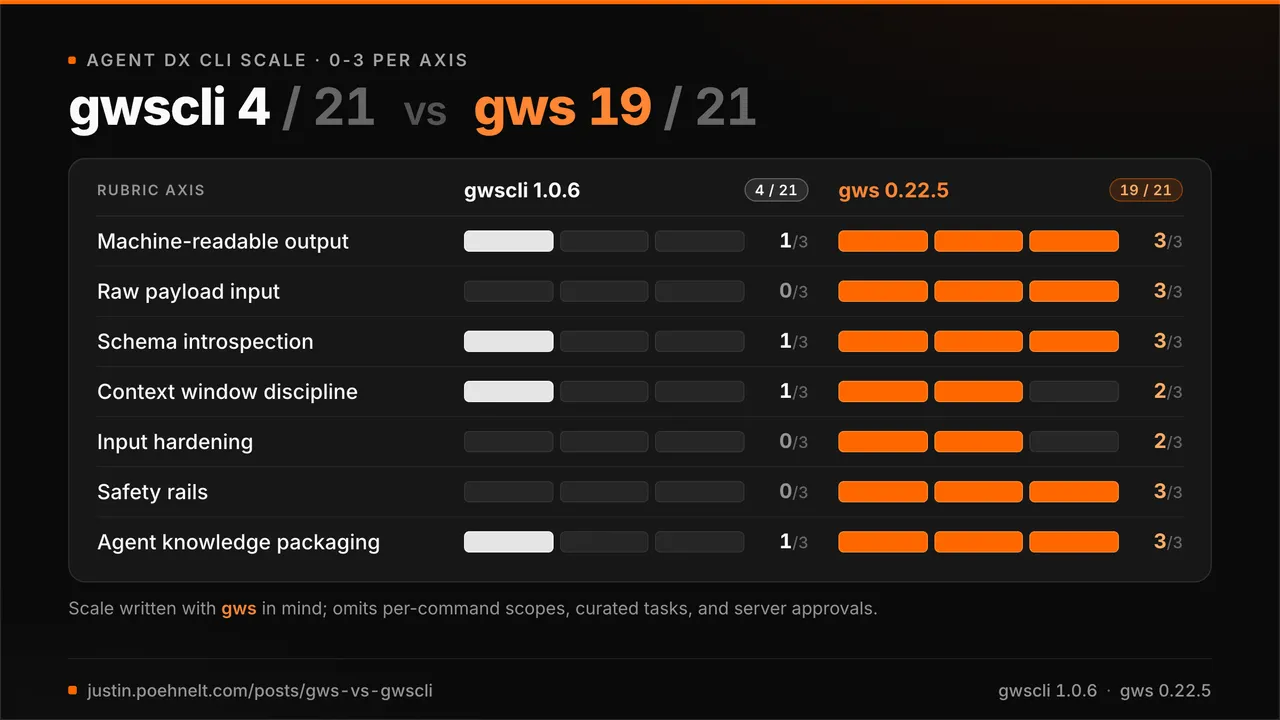
gwscli scores 1 on schema introspection because --schema describes outputs only (inputs live in flag help), and 0 on safety rails because the rubric grades --dry-run and sanitization rather than server-side approvals.
The Agent DX CLI Scale encodes gws’s principles, so gws scores high by construction. Testing both CLIs exposes three missing axes:
- Policy enforcement the agent cannot bypass.
gwscliwould score 3 andgws0. - Least-privilege authorization. Per-command scopes and
--show-scopesbeat per-service grants. - Curated task actions. Commands like
suggest_timeandread_file_content,viewUrllinks, and server-shaped views replace multi-step REST choreography.
“Machine-readable output” should also grade error ergonomics: distinct exit codes per failure class, typo suggestions, and concise errors without usage dumps.
Which CLI to use
Choose gwscli when:
- a shell agent works in Gmail, Calendar, Drive, Docs, Sheets, Slides, Chat, Tasks, or People
- a human can answer interactive approvals
- your organization needs admin controls, Google support, and February 1, 2027 MCP compliance
Choose gws when:
- a workflow needs actions
gwscli1.0.6 omits (sending email, sharing or deleting Drive files, Admin, Forms, Meet) - you run deterministic scripts, CI jobs, or service accounts
- you want
--dry-run, raw REST payloads, and local validation
Google’s gwscli guide warns that command signatures and output schemas can break without notice, so keep gwscli out of static scripts. If an agent workflow relies on gws for actions gwscli lacks, plan its move onto MCP before February 1, 2027.
Frequently asked questions
- What is the February 1, 2027 Google Workspace MCP deadline?
Google's November 24, 2026 announcement and Workspace AI Tools Addendum require AI agents, harnesses, and model-driven tools to use MCP instead of Workspace REST APIs directly. Technical enforcement begins February 1, 2027, restricting direct REST AI traffic to Standard Tier quotas, while deterministic scripts and CI can keep using REST APIs.
- What is gwscli?
gwscli is Google's official Google Workspace CLI. It reached general availability on November 24, 2026, alongside 8 Workspace remote MCP servers (People is in Developer Preview). Each command maps to an MCP tool.
- Is gws still usable?
Yes, for deterministic scripts, CI jobs, service accounts, and APIs gwscli omits. AI workflows calling Workspace REST APIs directly face Google's February 1, 2027 MCP deadline. gws is an open-source project, not an official Google product.
- Can gwscli send email?
No. Gmail commands in gwscli 1.0.6 create drafts but cannot send them. Its help describes Gmail as "Search emails, read threads, manage labels, and create drafts."
- Why does gwscli stop and wait for input?
Sensitive actions, such as sending a Chat message or trashing mail, trigger server-side approval. The CLI writes a prompt to stderr and waits for ALLOW_ONCE, ALLOW_TOOL_ALWAYS, or DENY_ONCE on stdin.