Secure Secrets in Google Apps Script
- The Problem: Apps Script lacks specific support for secrets, leading to hardcoded secrets.
- The Solution: Use Properties Service for config and Secret Manager for high-value secrets.
Unlike many modern development environments that support .env files or have built-in secret management deeply integrated into the deployment pipeline, Google Apps Script has historically left developers to fend for themselves.
It is all too common to see API keys, service account credentials, and other sensitive data hardcoded directly into Code.gs.
Stop doing this.
Hardcoding secrets makes your code brittle and insecure. If you share your script or check it into source control, your secrets are compromised.
Fortunately, there are ways for me to handle configuration and secrets securely in Apps Script: Properties Service and Google Cloud Secret Manager.
For service accounts specifically, I can often avoid keys entirely by using Service Account Impersonation.
Script Properties
For general configuration, environment variables, and non-critical keys, the built-in PropertiesService is the easy choice. It allows me to store key-value pairs that are scoped to the script but not visible in the code editor.
I can set these manually in the editor (Project Settings > Script Properties) or programmatically.
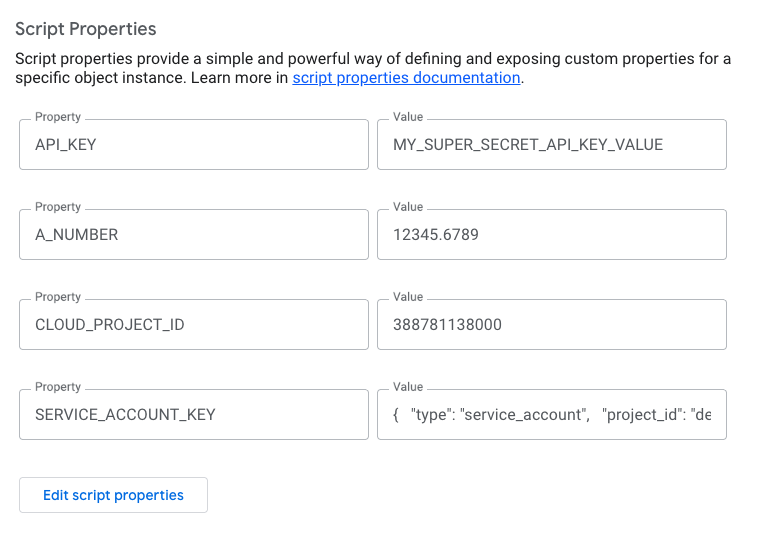
Script Properties in Apps Script Editor
Here is how I retrieve and parse them effectively. Note that getProperty always returns a string, so I need to handle type conversion myself.
function main() {
  // Get the Script Properties
  const scriptProperties = PropertiesService.getScriptProperties();

  // Properties are Strings
  const API_KEY = scriptProperties.getProperty("API_KEY");
  console.log(API_KEY);

  // Properties can be parsed as Number
  const A_NUMBER = Number.parseFloat(scriptProperties.getProperty("A_NUMBER"));
  console.log(A_NUMBER, typeof A_NUMBER);

  // Properties can be JSON strings
  const SERVICE_ACCOUNT_KEY = JSON.parse(
    scriptProperties.getProperty("SERVICE_ACCOUNT_KEY") ?? "{}",
  );
  console.log(SERVICE_ACCOUNT_KEY);
}
Google Cloud Secret Manager
For high-value secrets—like database passwords, API keys, or service account keys, Script Properties might not be enough. They are still accessible to anyone with edit access to the script.
In these cases, I leverage the Google Cloud Secret Manager. Since every Apps Script project is backed by a default Google Cloud project (or a standard one linked to it), I can use the UrlFetchApp to retrieve secrets directly from the GCP API.
This approach requires:
- Enabling the Secret Manager API in the GCP project.
- Granting the Secret Manager Secret Accessor role (
roles/secretmanager.secretAccessor) to the user running the script. (If you created the secret, you should have this role already.) - Adding the standard
https://www.googleapis.com/auth/cloud-platformscope toappsscript.json.
{
  "timeZone": "America/Los_Angeles",
  "dependencies": {},
  "exceptionLogging": "STACKDRIVER",
  "runtimeVersion": "V8",
  "oauthScopes": [
    "https://www.googleapis.com/auth/script.external_request",
    "https://www.googleapis.com/auth/cloud-platform"
  ]
}
Here is a reusable function to fetch and decode secrets on the fly:
function main() {
  // ... existing code ...

  // Use Google Cloud secret manager
  // Store the CLOUD_PROJECT_ID in Script Properties to keep the code clean
  const projectId =
    PropertiesService.getScriptProperties().getProperty("CLOUD_PROJECT_ID");
  if (!projectId) {
    throw new Error(
      "Script property 'CLOUD_PROJECT_ID' is not set. Please add it to Project Settings.",
    );
  }
  const MY_SECRET = getSecret(projectId, "MY_SECRET");

  console.log(MY_SECRET);
}

/**
 * Fetches a secret from Google Cloud Secret Manager.
 * @param {string} project - The Google Cloud Project ID
 * @param {string} name - The name of the secret
 * @param {string|number} version - The version of the secret (default: 'latest')
 * @returns {string} The decoded secret value
 */
function getSecret(project, name, version = "latest") {
  const cache = CacheService.getScriptCache();
  const cacheKey = `secret.${name}.${version}`;
  const cached = cache.get(cacheKey);
  if (cached) return cached;

  const endpoint = `projects/${project}/secrets/${name}/versions/${version}:access`;
  const url = `https://secretmanager.googleapis.com/v1/${endpoint}`;

  const response = UrlFetchApp.fetch(url, {
    headers: { Authorization: `Bearer ${ScriptApp.getOAuthToken()}` },
    muteHttpExceptions: true,
  });

  if (response.getResponseCode() >= 300) {
    throw new Error(`Error fetching secret: ${response.getContentText()}`);
  }

  // Secrets are returned as base64 strings, so we must decode them
  const encoded = JSON.parse(response.getContentText()).payload.data;
  const decoded = Utilities.newBlob(
    Utilities.base64Decode(encoded),
  ).getDataAsString();

  // Cache for 5 minutes (300 seconds)
  cache.put(cacheKey, decoded, 300);
  return decoded;
}
Wait, did we just go in a circle?
Yes, I am suggesting you store the Project ID of your secrets vault inside the Script Properties where we used to carelessly toss your API keys. But unlike a raw credential, a Project ID is just a pointer. Think of it as the difference between publicly listing your home address versus leaving your front door unlocked. People can know where you live, but without permissions, they can’t come in!
Why Caching Matters
Retrieving a secret via UrlFetchApp involves an external network request, which adds latency to your script’s execution. Furthermore, Google Cloud Secret Manager has usage quotas and costs associated with API calls.
In the getSecret function above, I use CacheService to store the decoded secret. This ensures that subsequent calls within the same environment don’t trigger unnecessary network overhead, making the script significantly faster and more resilient to API rate limits.
Why go this far?
Using Secret Manager provides audit logging, versioning, and finer-grained IAM controls. By combining PropertiesService for configuration and Secret Manager for actual secrets, I can keep Code.gs clean and secure.
Additional Reading
- Service Account Impersonation in Apps Script
- Key Value Stores in Apps Script
- Building Secure AI Agents
Frequently Asked Questions
How do I store secrets in Google Apps Script?
For general configuration, use PropertiesService. For sensitive secrets like API keys or database passwords, use Google Cloud Secret Manager.
Why use Google Cloud Secret Manager instead of Script Properties?
Script Properties are visible to anyone with edit access to the script. Secret Manager provides audit logging, versioning, and finer-grained IAM controls, securing high-value secrets.
How can I improve performance when fetching secrets?
Use CacheService to store the decoded secret after fetching it from Secret Manager to avoid unnecessary network calls and reduce API costs.
Opinions are my own and not the views of my employer.
© 2025 by Justin Poehnelt is licensed under CC BY-SA 4.0